

Baby & Family
The Best Kids Tablets: 4 Compared (and One to Skip)
Four kid-specific tablets compared on parental controls, durability, content ecosystems, and how long each one lasts before kids outgrow it.
The short version
For most families the Amazon Fire HD 10 Kids Pro is the kids tablet to buy: the Parent Dashboard controls are granular, the 1080p screen and long battery life suit daily use, and the two-year worry-free guarantee means a shattered tablet gets replaced rather than mourned. The Samsung Galaxy Tab A11+ Kids Edition is the pick if you want a bigger screen, up to seven generations of OS and security updates and a tablet that still makes sense after your child outgrows kids mode - just accept that the parental controls need manual setup and there is no Amazon-style accidental-damage coverage. The Fire HD 8 Kids is a fine first tablet for ages 3-7 but feels cramped and slow beyond that. The LeapFrog LeapPad Academy is the one to skip: low-resolution, and centered on a LeapFrog content library, at a price that buys a more capable Fire. Best for: parents of 6-12-year-olds who want strong controls with a real safety net - the Fire HD 10 Kids Pro; a bigger screen and longevity - the Galaxy Tab A11+ Kids Edition.
Our picks at a glance
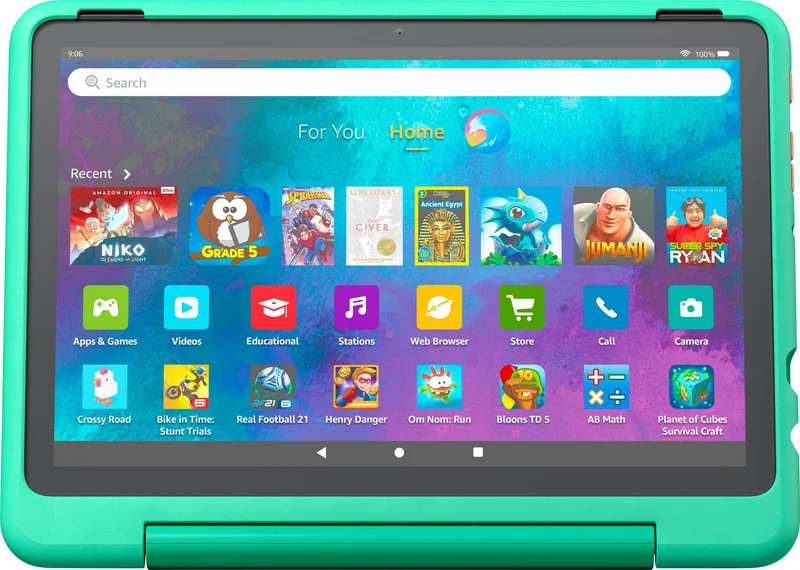
- Amazon Fire HD 10 Kids Pro - Buy. The default choice for school-age kids: a big 1080p screen, the granular parental controls, and a two-year breakage replacement guarantee.
- Samsung Galaxy Tab A11+ Kids Edition - Buy. The kids tablet that grows up with the kid: Samsung Kids parental controls on a big 11-inch 1920x1200 screen, in a handled shock-absorbing case.
- Amazon Fire HD 8 Kids - It depends. The right first tablet for a preschooler - and the wrong tablet for anyone older than about seven.
- LeapFrog LeapPad Academy - Skip. A well-intentioned learning tablet built on hardware and a content library that 2026 has left behind.
The verdict in 30 seconds
What mattered most
- Screen
- Best age range
- Parental controls
- App and content ecosystem
- Battery life (reported)
- Damage protection included
A kids tablet is really three products in one: a screen your child wants, a control panel you actually trust, and a warranty for the day it hits the kitchen floor. We compared the four kid-specific tablets that dominate popular picks in 2026 - two Amazon Fire Kids models, Samsung's Galaxy Tab Kids Edition, and LeapFrog's LeapPad Academy. Two earn a clear buy, one makes sense only for a specific age band, and one is hard to recommend over the alternatives.
The default choice for school-age kids: a big 1080p screen, the granular parental controls, and a two-year breakage replacement guarantee.
Best for: Families with kids roughly 6-12 who want maximum parental control and don't mind living inside Amazon's ecosystem
- Amazon Kids Parent Dashboard lets you set per-activity time limits, require reading before games, and pause the device from your phone
- Two-year worry-free guarantee - Amazon replaces the tablet if a child breaks it
- Bright 10.1-inch 1080p screen and roughly 13-hour battery, with a year of ad-free Amazon Kids+ content included
- Slim case suits ages 6-12 without looking babyish
- Locked to the Amazon Appstore - no Google Play, so some popular apps are missing or arrive late
- The interface steers kids toward Amazon content, and controls take an evening to set up properly
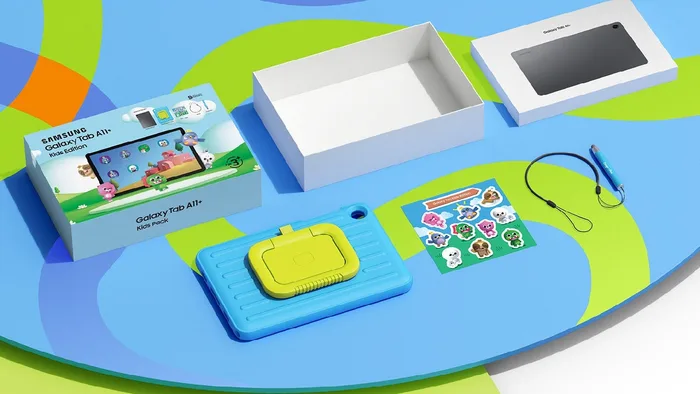
The kids tablet that grows up with the kid: Samsung Kids parental controls on a big 11-inch 1920x1200 screen, in a handled shock-absorbing case.
Best for: Parents who want a Galaxy tablet that starts as a gated kids device and converts to normal use as the child gets older
- 11-inch 1920x1200 display, the largest screen in this comparison, with refresh rates of up to 90Hz
- Samsung Kids comes preloaded, with parent control over screen time, app access, contacts and content behind a PIN
- 128GB of storage, a microSD slot for more, and up to seven generations of OS and security upgrades
- Shock-absorbing case with a carry handle plus a Crayo-Pen stylus and tether in the box
- Still a fully capable Galaxy tablet once the child outgrows kids mode
- The parental controls are not switched on out of the box; you create the PIN and set them up yourself
- No Amazon-style accidental-damage replacement guarantee is listed with the bundle
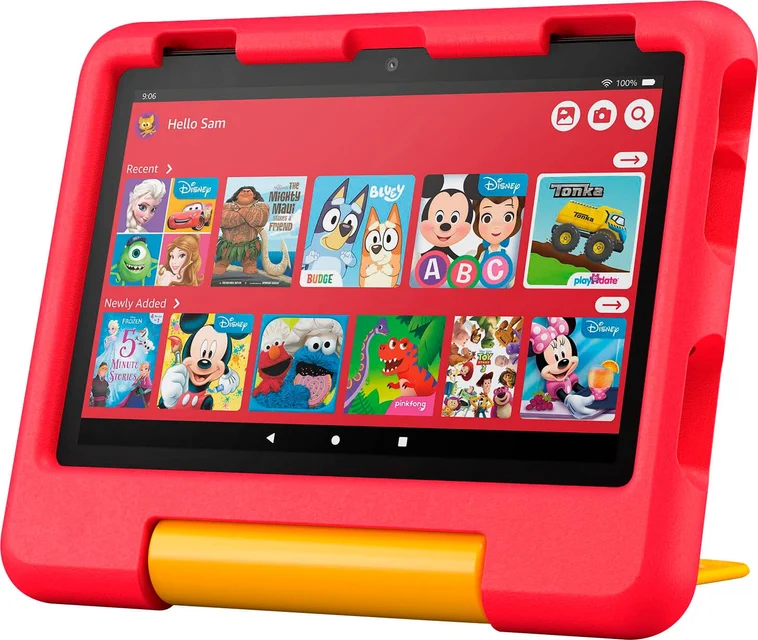
The right first tablet for a preschooler - and the wrong tablet for anyone older than about seven.
Best for: Ages 3-7, first-tablet households, or families that expect drops, spills, and sandbox incidents
- Same two-year worry-free replacement guarantee and Amazon Kids+ year as its bigger sibling, at a lower price tier
- Chunky handle case built for toddler handling, with long battery life
- Identical Parent Dashboard controls to the Fire HD 10 Kids Pro
- 8-inch 1280x800 screen looks soft, and the modest processor can get sluggish as apps grow
- Kids over 6-7 may outgrow it quickly and want the larger 10-inch
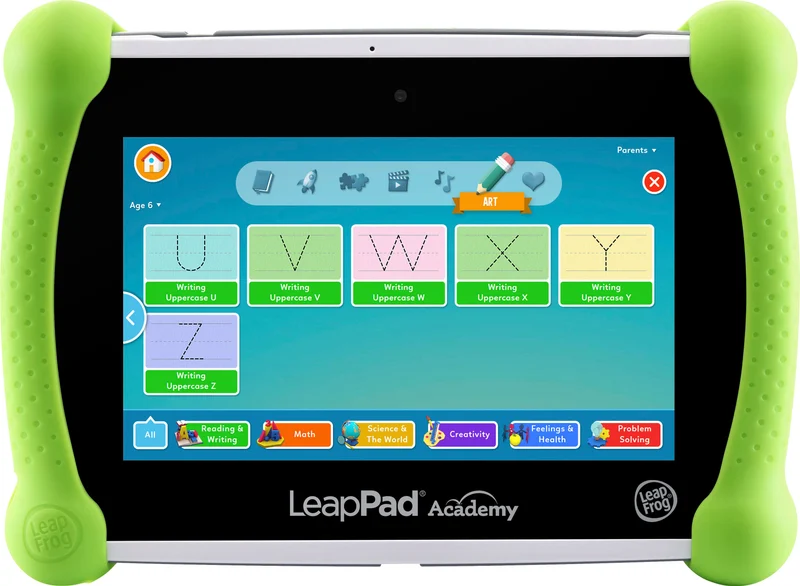
A well-intentioned learning tablet built on hardware and a content library that 2026 has left behind.
Best for: Parents who want a LeapFrog-curated learning tablet for ages 3-8 - a Fire HD 8 Kids covers similar ages with a sharper screen and a breakage guarantee
- Curriculum-style educational content with age-leveled progression and a kid-friendly LeapSearch browser
- Shatter-safe 7-inch screen, silicone bumper with kickstand, and a 2-year manufacturer warranty
- Dated 7-inch 1024x600 screen and a 1.5GHz quad-core processor with 16GB of storage
- Content centers on LeapFrog's own library plus approved Android apps, and LeapFrog's age range tops out at 8
- Priced in the same budget tier as a Fire HD 8 Kids, which has a larger, sharper screen
| Criteria | Amazon Fire HD 10 Kids Pro Top pick | Samsung Galaxy Tab A11+ Kids Edition | Amazon Fire HD 8 Kids | LeapFrog LeapPad Academy |
|---|---|---|---|---|
| Verdict | Buy it | Buy it | It depends | Skip it |
| Best for | Families with kids roughly 6-12 who want maximum parental control and don't mind living inside Amazon's ecosystem | Parents who want a Galaxy tablet that starts as a gated kids device and converts to normal use as the child gets older | Ages 3-7, first-tablet households, or families that expect drops, spills, and sandbox incidents | Parents who want a LeapFrog-curated learning tablet for ages 3-8 - a Fire HD 8 Kids covers similar ages with a sharper screen and a breakage guarantee |
| Price tier | $$ · mid-range | $$ · mid-range | $ · budget | $ · budget |
| Screen | 10.1-inch, 1080p | 11-inch, 1920x1200, up to 90Hz | 8-inch, 1280x800 | 7-inch, 1024x600 |
| Best age range | 6-12 | Kids, then general use as they grow (Samsung says it suits teens and adults too) | 3-7 | 3-8 per LeapFrog |
| Parental controls | Amazon Kids Parent Dashboard: time limits, learn-first goals, remote pause | Samsung Kids: screen time, app access, contacts and content (PIN set up by the parent) | Amazon Kids Parent Dashboard, same as the 10-inch | On-device time limits and app/website choices |
| App and content ecosystem | Amazon Appstore + 1 year Amazon Kids+ | Samsung Kids apps, 6 weeks of ABCmouse, Galaxy Store | Amazon Appstore + 1 year Amazon Kids+ | LeapFrog library plus approved Android apps |
| Battery life (reported) | Around 13 hours | Up to 15 hours of video playback per Samsung - Around 13 hours - Not verified | - | - |
| Damage protection included | 2-year worry-free replacement + slim case | Shock-absorbing handled case, no breakage replacement listed | 2-year worry-free replacement + handle case | Shatter-safe screen, bumper, 2-year warranty |
| Price tier | $$ · mid-range | $$ · mid-range | $ · budget | $ · budget |
Which one is right for you?
- Families with kids roughly 6-12 who want maximum parental control and don't mind living inside Amazon's ecosystem Buy it Amazon Fire HD 10 Kids Pro
- Parents who want a Galaxy tablet that starts as a gated kids device and converts to normal use as the child gets older Buy it Samsung Galaxy Tab A11+ Kids Edition
- Ages 3-7, first-tablet households, or families that expect drops, spills, and sandbox incidents It depends Amazon Fire HD 8 Kids
- Parents who want a LeapFrog-curated learning tablet for ages 3-8 - a Fire HD 8 Kids covers similar ages with a sharper screen and a breakage guarantee Skip it LeapFrog LeapPad Academy
How we judged the field
We don’t run a lab. This comparison relies on each maker’s published specifications. Four criteria mattered most: how much real control parents get over time and content, how the hardware survives child ownership, how rich the content ecosystem is for the target age, and how long the tablet stays useful before the child outgrows it. We limited the field to kid-specific tablets and kids editions with bundled cases and parental controls; general budget tablets are a separate category we cover elsewhere.
Amazon Fire HD 10 Kids Pro
Buy itThe Fire HD 10 Kids Pro is the tablet the rest of the category gets measured against, and in 2026 that’s still deserved. The 10.1-inch 1080p screen is bright and sharp enough for comics and video, the battery is rated for long use, and the slim bundled case protects without embarrassing a nine-year-old. What separates it is the software: the Amazon Kids Parent Dashboard lets you set separate limits for games versus reading, require educational time before entertainment unlocks, block sites, approve every download, and pause the whole tablet from your phone. Then there’s the two-year worry-free guarantee - if your child breaks the tablet, Amazon replaces it. The downsides: you live in the Amazon Appstore, which lacks some popular titles, and the whole experience gently funnels kids toward Amazon content. For most families those trade-offs are worth it.
Samsung Galaxy Tab A11+ Kids Edition
Buy itSamsung’s answer bundles its Galaxy Tab A11+ - an 11-inch 1920x1200 tablet, the largest screen in this comparison - with a shock-absorbing case that has a carry handle, a Crayo-Pen stylus with a tether, and the preloaded Samsung Kids environment. The pitch is simple and genuinely compelling: your child gets a gated space now, with parents controlling screen time, app access, contacts and content behind a PIN, and Samsung lists up to seven generations of OS and security upgrades, so the tablet stays supported for years. It also remains fully useful after childhood - retire kids mode and it’s a normal Galaxy tablet for homework and streaming. The compromises are real, though. The parental controls are not on out of the box and need a manual PIN setup, and the bundle lists no Amazon-style accidental-damage replacement - if it breaks, that’s on you. Buy it for flexibility and longevity, not for ruggedness guarantees.
Amazon Fire HD 8 Kids
It dependsThe Fire HD 8 Kids is two-thirds of the Fire HD 10 Kids Pro at a lower price, and whether that’s a bargain depends entirely on your child’s age. For a three-to-six-year-old it’s arguably the perfect first tablet: the chunky handle case shrugs off abuse, the same two-year replacement guarantee applies, battery life is long, and the Parent Dashboard controls are identical to its bigger sibling. But the 8-inch 1280x800 screen looks soft next to any modern display, and the modest processor gets sluggish as apps and expectations grow. Kids past first or second grade may start to outgrow it. If your child is under seven and this is a first tablet, it’s a sensible buy. If they’re six or older, spend up for the Fire HD 10 Kids Pro from the start.
LeapFrog LeapPad Academy
Skip itWe wanted to like the LeapPad Academy - LeapFrog’s education-first philosophy is admirable, and the curriculum-leveled content is thoughtfully built. But the hardware and the walled garden haven’t kept pace. The 7-inch 1024x600 screen is the lowest-resolution here, and the 1.5GHz quad-core processor and 16GB of storage are modest. Content centers on LeapFrog’s own library, with approved Android apps available, and more content is sold separately. LeapFrog rates it for ages 3-8 and includes parent controls for time limits and app or website choices, a 2-year warranty and a shatter-safe screen. The problem is the comparison shelf: it sits in the same budget tier as a Fire HD 8 Kids, which has a larger, sharper screen and a breakage replacement guarantee. For most buyers the Fire is the better answer.
Amazon Fire HD 10 Kids Pro vs Samsung Galaxy Tab A11+ Kids Edition: which should you buy?
This comes down to control versus freedom. The Fire HD 10 Kids Pro wins on the parenting side: its dashboard is granular, it offers learn-first goals, and the two-year worry-free guarantee removes a big anxiety of handing a child an expensive slab of glass. The Galaxy Tab A11+ Kids Edition wins on the tablet side: a bigger screen, microSD expansion, long software support, and a second life as a regular tablet when kids mode is done. Its weak point on the parenting side is that the controls need a manual PIN setup. Choose the Fire for ages 6-9, heavy-handed screen-time enforcement, or accident-prone kids. Choose the Samsung for ages 8 and up, a bigger screen, and the longest useful life per unit of money.
What to look for
- Parental controls you’ll actually use: remote pause, per-category time limits, and download approval from your own phone matter more than any spec.
- A real damage policy: bundled cases help, but Amazon’s two-year guarantee replaces a broken tablet - factor that into any price comparison.
- Content ecosystem for the age: a walled garden is a feature at four and a prison at eight; check what the tablet offers your child two years from now.
- Screen size and quality: 1080p at 10 inches or better is worth it for any child doing more than watching cartoons at arm’s length.
- Exit strategy: the best value tablets either survive to be handed down or graduate into normal use - dead-end platforms are the most expensive kind of cheap.
Our final take
The kids tablet market in 2026 has consolidated around two good answers. The Amazon Fire HD 10 Kids Pro is the pick for most families: granular controls, a two-year breakage guarantee, and hardware that comfortably spans the 6-12 years. The Samsung Galaxy Tab A11+ Kids Edition is the runner-up and the better buy for older kids, trading Amazon’s safety net for a bigger screen and a longer useful life. The Fire HD 8 Kids remains a smart, cheap first tablet strictly for the preschool years. And the LeapPad Academy, whatever its educational pedigree, is outclassed by the Fire HD 8 Kids at a similar price - skip it.
Questions, answered
What actually makes a 'kids' tablet different from a regular tablet?
Three things: a bundled protective case, a child-safe launcher with curated content, and parent-side controls for screen time and app approval. Amazon adds a differentiator - a two-year guarantee that replaces the tablet if a child breaks it. On a regular tablet you can approximate the software side with built-in family tools, but you give up the bundled protection and the kid-first interface.
Fire Kids vs Fire Kids Pro - what's the difference?
The hardware at each size is closely related. The Kids versions (ages 3-7) come with a chunky handle case and a preschool-style interface; the Kids Pro versions (ages 6-12) ship a slimmer case and an interface that looks more grown-up, with slightly looser defaults like a filtered web browser. Pick by age and case style, not by specs.
Why not just buy a regular tablet and use parental controls?
For older kids that's a legitimate route, and it's effectively what the Galaxy Tab A11+ Kids Edition packages for you: a standard Galaxy tablet plus Samsung Kids and a shock-absorbing case in one box. For younger children, though, the Fire Kids bundles are hard to beat - the replacement guarantee can outweigh the cost difference the first time the tablet meets a hard floor.
Do these tablets need a subscription to be useful?
No, but Amazon's tablets are designed around one. Both Fire Kids models include a year of Amazon Kids+ (ad-free books, videos, games, and apps); after that it is a paid subscription, and without it you buy content from the Amazon Appstore. The Samsung comes with Samsung Kids preloaded and 6 weeks of ABCmouse (a subscription after that), and the LeapPad includes preloaded apps, with more content sold separately.
How long before a child outgrows each of these?
Roughly: LeapFrog rates the LeapPad Academy for ages 3-8, so it is outgrown first. The Fire HD 8 Kids suits younger kids, up to around 7, before the small screen starts to feel limiting. The Fire HD 10 Kids Pro is aimed at 6-12, and the Galaxy Tab A11+ Kids Edition lasts longest of all - once kids mode is retired it keeps working as a normal Android tablet.
Deciding between the top two? See our head-to-head: Amazon Fire HD 10 Kids Pro vs Samsung Galaxy Tab A11+ Kids Edition.
More Baby & Family reviews
 The Best Kids Water Bottles: 4 Compared (and One to Skip)
  The Best Magnetic Tiles: 4 Compared (and One to Skip)
  The Best Nursery Blackout Curtains and Blinds: 4 Compared (and One to Skip)
  The Best Nursery Gliders and Rocking Chairs: 4 Compared (and One to Skip)
  The Best Nursery Humidifiers: 4 Compared (and One to Skip)
  The Best Nursing Pillows: 4 Compared (and One to Skip)