

Baby & Family
The Best Kids Smartwatches: 6 Compared (and One to Skip)
Six calling and GPS watches for children compared on plan and carrier requirements, parent app controls, school-hours modes, and how each maker describes its location and emergency features.
The short version
The Garmin Bounce 2 is the best overall pick because its parent app covers school hours, location requests and messaging in one place, and Garmin states exactly which features need its LTE subscription. The Verizon Gizmo Watch 4 is the value pick for families already on Verizon, since it needs Verizon's own watch plan and adds school mode, safe zones and watch-removal alerts. The Bark Watch suits parents who want message monitoring and a 911-capable SOS button, with the trade-off that a third party scans your child's texts. The Pinwheel Watch and the Apple Watch SE 3 are for specific buyers: Pinwheel for a locked-down contact list, Apple only for iPhone households. The Gabb Watch 3e is the one to skip, because Gabb says its location updates about every 15 minutes and its SOS button does not reach 911. Best for: a first connected watch for a child who has no phone yet.
Our picks at a glance
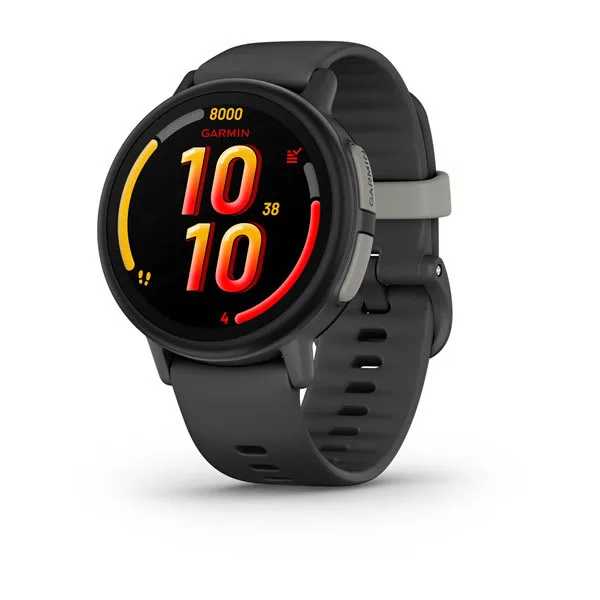
- Garmin Bounce 2 - Buy. An LTE kids watch with a full parent app, school mode, on-request location tracking and a clearly documented subscription.
- Verizon Gizmo Watch 4 - Buy. Verizon's own kids watch, with video calling, safe zones, school mode and a dedicated low-cost watch plan.
- Bark Watch - Buy. A Galaxy Watch8 based kids watch with LTE calls and texts, GPS, and Bark's message monitoring.
- Pinwheel Watch - It depends. A standalone kids watch built around an approved-contacts list, text review and an optional parent-monitored AI chat.
- Apple Watch SE 3 (cellular, Family Setup) - It depends. The cellular Apple Watch SE 3 set up through Family Setup, for children whose parents have an iPhone.
- Gabb Watch 3e - Skip. A simple calling and texting watch, held back by slow location updates and an SOS button that does not reach 911.
The verdict in 30 seconds
What mattered most
- Calling
- Location as the maker states it
- Parent app
- School or quiet mode
- Plan requirement
- SOS or emergency button
A kids smartwatch is a phone-light device that talks to your child's wrist and your own phone, and it sends your child's location and messages through a company's servers. That makes the plan, the parent app and the data rules as important as the hardware. We compared six watches that call, text and share location, from six different makers, and read each maker's own pages for plan requirements and what each feature does and does not do. For a general adult smartwatch, see our smartwatches review; for a cheaper way to find a backpack, see our Bluetooth trackers review.
An LTE kids watch with a full parent app, school mode, on-request location tracking and a clearly documented subscription.
Best for: Parents who want one app for school hours, location and messaging, and who are comfortable with a monthly subscription.
- The owner's manual spells out which features need the LTE subscription: voice calling, text and voice messaging, LiveTrack, assistance, and chores and rewards.
- School mode can silence the watch, or silence it and restrict games and messages, during hours the parent sets, and the child can still request assistance.
- Rated 5 ATM, with an estimated battery life of up to 2 days that Garmin says varies with connected features and LTE conditions.
- Calling, messaging and location all stop working without an active LTE subscription and network coverage, and the watch must be set up through the Garmin Jr. app.
- Assistance is not a path to emergency services: Garmin says the app does not contact emergency services on your behalf.
- Garmin's product pages and manual do not name the cellular carrier, so check the coverage page before buying, especially in rural areas.
Own the Garmin Bounce 2? Tell us how it held up.
Thanks. Counted, and shown once enough owners have weighed in.
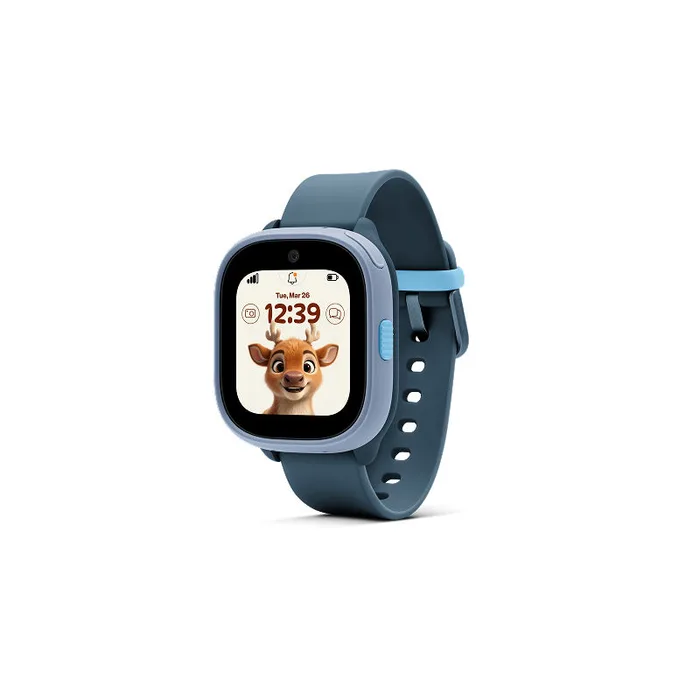
Verizon's own kids watch, with video calling, safe zones, school mode and a dedicated low-cost watch plan.
Best for: Families already on Verizon who want video calling and safe zones on a simple plan.
- Verizon lists a 1.6 inch scratch-resistant screen, video calling, up to 40 trusted contacts and a distraction-free school mode.
- Watch removal alerts and custom safe zones are managed in the Verizon Family app, which Verizon says is included with a Gizmo watch service.
- Verizon's FAQ explains the location order: GPS first, then Wi-Fi, then cellular, with accuracy that varies from a few yards to up to a mile on cellular.
- It needs the Unlimited for Gizmo plan, and Verizon says data slows to up to 600 Kbps after 15 GB in a month.
- Verizon's FAQ states that Gizmo watches are not compatible with 911 or similar emergency numbers.
- It is tied to Verizon service, so families on another carrier add a new line just for the watch.
Own the Verizon Gizmo Watch 4? Tell us how it held up.
Thanks. Counted, and shown once enough owners have weighed in.
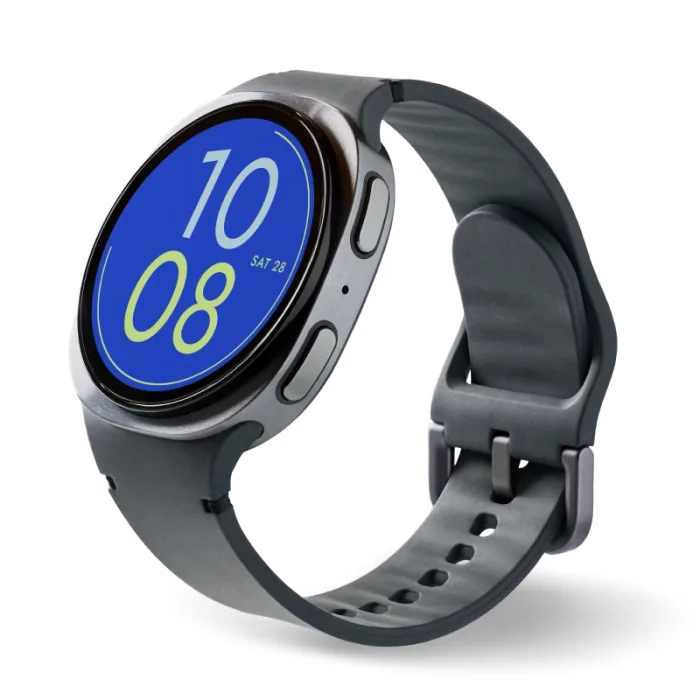
A Galaxy Watch8 based kids watch with LTE calls and texts, GPS, and Bark's message monitoring.
Best for: Parents who want message monitoring and a 911-capable SOS button, and accept the privacy trade-off.
- Bark lists dual-frequency GPS (L1 + L5), a 1.34 inch display, 5ATM plus IP68 and MIL-STD-810H durability, and no camera.
- A SOS button can start a 911 call, which Bark's FAQ describes, unlike several rivals here.
- Bark scans texts, photos and videos for signs of bullying and other issues and alerts parents, and the plan includes the Bark App for the family.
- Bark's service plan is required to activate the watch, and the plan covers cell service and parental controls together.
- Content monitoring means a third party reads your child's messages and images, which some families will not want.
- Bark does not publish a battery life figure on its product page, only a 325 mAh battery size.
Own the Bark Watch? Tell us how it held up.
Thanks. Counted, and shown once enough owners have weighed in.
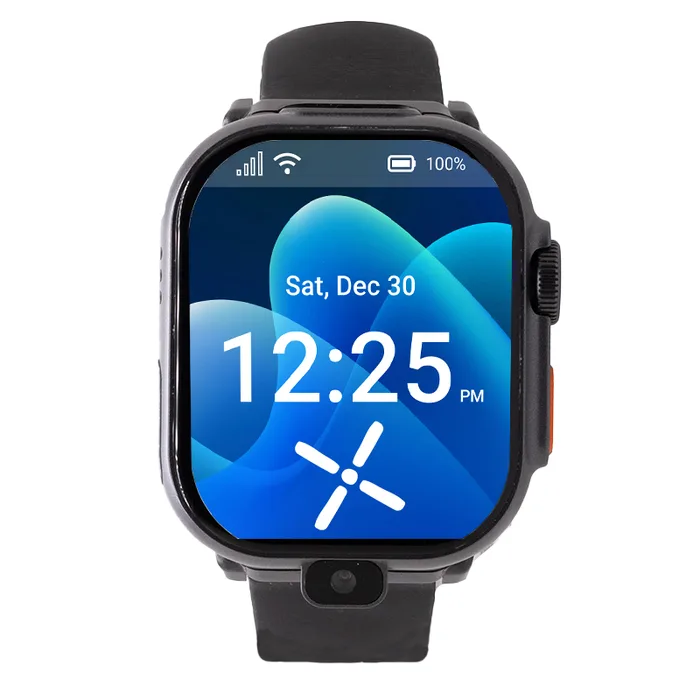
A standalone kids watch built around an approved-contacts list, text review and an optional parent-monitored AI chat.
Best for: Parents who want strict control over who can reach their child and are fine with a camera-equipped watch.
- Only approved numbers can call or text, and parents can review text messages and call history from the Caregiver Portal.
- Focus mode turns the watch into a plain watch for school and bedtime, and Pinwheel says emergency contacts stay reachable.
- The two cameras can be disabled, and games and the AI chat are optional extras you choose whether to install.
- Pinwheel's watch page does not publish battery life, water resistance or how often location updates.
- Pinwheel says the watch is not yet available in Alaska, and its watch page does not name the cellular carrier.
- It needs a Pinwheel subscription, which includes 2 GB of high-speed data according to the page.
Own the Pinwheel Watch? Tell us how it held up.
Thanks. Counted, and shown once enough owners have weighed in.
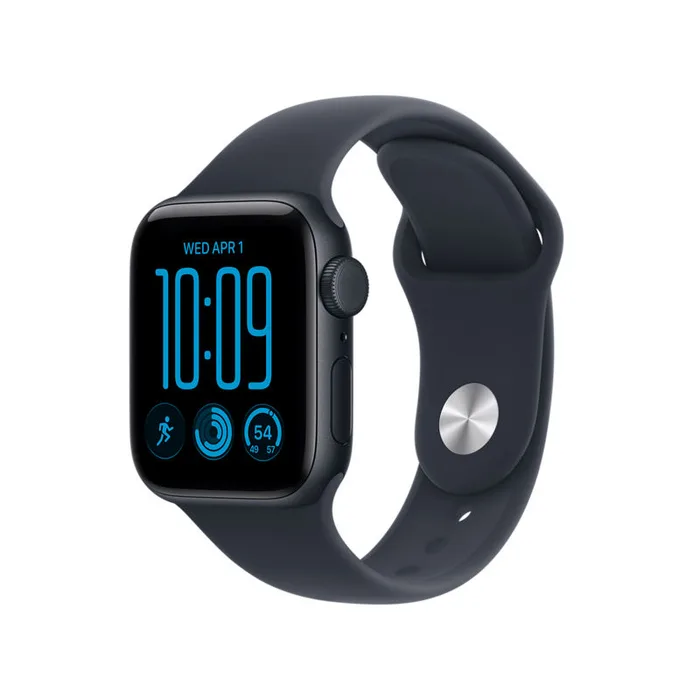
The cellular Apple Watch SE 3 set up through Family Setup, for children whose parents have an iPhone.
Best for: iPhone families who want a watch that can also grow into a regular Apple Watch later.
- Apple's support page lists Schooltime, shared contacts managed through Screen Time, and location sharing through Find My.
- Apple lists 50 m water resistance and up to 18 hours of normal use for the SE 3, and the cellular model supports 5G RedCap and LTE.
- A cellular plan is not required to set the watch up, so the watch can be set up before you choose a plan.
- Setup and management need a parent's iPhone, and the child needs their own Apple Account in a Family Sharing group.
- Apple says some features need a cellular plan, and your carrier must support the watch for kids.
- Apple lists features that are not available on a family-set-up watch, including ECG, sleep tracking and blood oxygen.
Own the Apple Watch SE 3 (cellular, Family Setup)? Tell us how it held up.
Thanks. Counted, and shown once enough owners have weighed in.
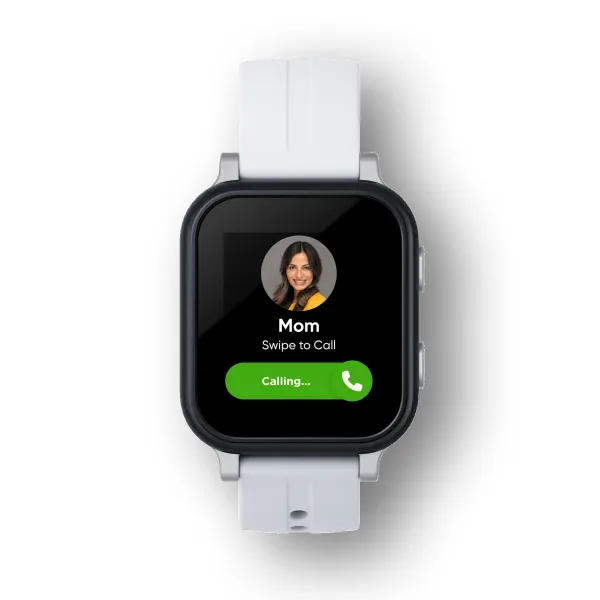
A simple calling and texting watch, held back by slow location updates and an SOS button that does not reach 911.
Best for: Younger children who mainly need to call parents, if you accept the slow location refresh.
- Gabb lists parent-approved contacts, up to 100 of them, plus group texting and a Focus Mode set from the MyGabb app.
- IP68 water resistance and Gorilla Glass 3 are listed on Gabb's spec table.
- It works without a phone and has its own number, according to Gabb.
- Gabb states that GPS location updates about every 15 minutes and is not a real-time or continuous monitoring service.
- Gabb states the SOS button calls your designated parent or guardian only, not 911 or emergency services.
- Gabb gives expected battery life as 14 to 18 hours of normal use, and the watch joins only 2.4 GHz Wi-Fi networks.
- A Gabb plan is required, and the device purchase carries contract terms with an early termination fee.
Own the Gabb Watch 3e? Tell us how it held up.
Thanks. Counted, and shown once enough owners have weighed in.
| Criteria | Garmin Bounce 2 Top pick Buy it Buy | Verizon Gizmo Watch 4 Buy it Buy | Bark Watch Buy it Buy | Pinwheel Watch It depends Buy | Apple Watch SE 3 (cellular, Family Setup) It depends Buy | Gabb Watch 3e Skip it Buy |
|---|---|---|---|---|---|---|
| Best for | Parents who want one app for school hours, location and messaging, and who are comfortable with a monthly subscription. | Families already on Verizon who want video calling and safe zones on a simple plan. | Parents who want message monitoring and a 911-capable SOS button, and accept the privacy trade-off. | Parents who want strict control over who can reach their child and are fine with a camera-equipped watch. | iPhone families who want a watch that can also grow into a regular Apple Watch later. | Younger children who mainly need to call parents, if you accept the slow location refresh. |
| Price tier | $$$ · premium | $ · budget | $$$ · premium | $$ · mid-range | $$ · mid-range | $$ · mid-range |
| Calling | Voice calls and voice or text messages | Voice and video calls | Calls and texts over LTE | Calls and texts from approved numbers | Calls and messages through Family Setup | Unlimited call and text |
| Location as the maker states it | LiveTrack on parent request, ends after 30 minutes unless extended | GPS, then Wi-Fi, then cellular | Dual-frequency GPS (L1 + L5) | Location on the Caregiver Portal dashboard, update rate not stated | L1 GPS, shared through Find My | GPS updates about every 15 minutes |
| Parent app | Garmin Jr. | Verizon Family | Bark App | Caregiver Portal | Apple Watch app and Screen Time on parent iPhone | MyGabb |
| School or quiet mode | School mode | School mode | Not named on the product page | Focus mode for school and bedtime | Schooltime | Focus Mode |
| Plan requirement | LTE subscription from Garmin | Unlimited for Gizmo plan | Bark service plan | Pinwheel subscription | Cellular plan optional for setup, needed for some features | Gabb plan |
| SOS or emergency button | Assistance alerts family, does not contact emergency services | Not compatible with 911 | SOS can start a 911 call | Emergency contacts stay reachable in focus mode | Emergency SOS listed on spec sheet | Calls your parent contact, not 911 |
| Water resistance | 5 ATM | Water-resistant, rating not stated in Verizon's launch release | 5ATM + IP68 | Not published | 50 m | IP68 |
| Battery as the maker states it | Up to 2 days estimated | Up to 3 days | Not published, 325 mAh | Not published | Up to 18 hours normal use | 14 to 18 hours normal use |
Which one is right for you?
- Parents who want one app for school hours, location and messaging, and who are comfortable with a monthly subscription. Buy it Garmin Bounce 2
- Families already on Verizon who want video calling and safe zones on a simple plan. Buy it Verizon Gizmo Watch 4
- Parents who want message monitoring and a 911-capable SOS button, and accept the privacy trade-off. Buy it Bark Watch
- Parents who want strict control over who can reach their child and are fine with a camera-equipped watch. It depends Pinwheel Watch
- iPhone families who want a watch that can also grow into a regular Apple Watch later. It depends Apple Watch SE 3 (cellular, Family Setup)
- Younger children who mainly need to call parents, if you accept the slow location refresh. Skip it Gabb Watch 3e
How we judged the field
Five things matter most in a child’s watch. First is the plan: which carrier or subscription it needs, what it covers, and whether the watch works at all without it. Second is the parent app, because that is where contacts, school hours and location live. Third is location, judged only by how the maker describes it, since update rates and accuracy claims vary and most are not published. Fourth is the emergency button, because makers differ on whether it reaches 911 or only a parent. Fifth is data: what the company can see, such as messages and photos, and what you can switch off.
The field splits into watches tied to one carrier, like Verizon’s Gizmo, watches sold with their own plan, like Garmin, Bark, Pinwheel and Gabb, and the Apple Watch, which depends on a parent’s iPhone. We picked six from six makers that call, text and share location, and left out watches whose maker pages we could not load. Prices are described only by tier.
Garmin Bounce 2
Buy itThe Garmin Bounce 2 is the most complete package here. The owner’s manual lists the features that need its LTE subscription: voice calling, text and voice messaging, LiveTrack, assistance, and chores and rewards. School mode silences the watch or restricts games and messages during hours you set, and your child can still request assistance. LiveTrack shows current and recent locations on request and ends after 30 minutes unless you extend it, which is a useful limit on constant tracking. Garmin rates it 5 ATM and estimates up to 2 days of battery, with the caveat that connected use and LTE conditions change that. The caution is plain: assistance does not contact emergency services, and the manual and announcement do not name the carrier. Check coverage first. It is for parents who want one app and a clear plan.
Verizon Gizmo Watch 4
Buy itThe Verizon Gizmo Watch 4 launched in July 2026 and is the practical choice for families on Verizon. Verizon lists a 1.6 inch scratch-resistant screen, video calling, up to 40 trusted contacts, safe zones, watch removal alerts and a distraction-free school mode, all managed in the Verizon Family app. The plan is the catch and the appeal: Verizon’s FAQ says a Gizmo watch needs the Unlimited for Gizmo plan, with data slowing to up to 600 Kbps after 15 GB in a month. Verizon also explains its location method, GPS then Wi-Fi then cellular, with cellular accuracy ranging from tens of yards to a mile. It states that Gizmo watches are not compatible with 911. It is the value pick for Verizon households, and a poor fit if you would need a new line.
Bark Watch
Buy itThe Bark Watch is built on a Samsung Galaxy Watch8 and runs Bark’s parental controls with LTE calls and texts. The product page lists a 1.34 inch display, dual-frequency GPS (L1 + L5), 5ATM plus IP68, MIL-STD-810H durability and no camera. Its main difference is content monitoring: Bark scans texts, photos and videos for signs of bullying and other issues, and alerts parents. Its FAQ also says the SOS button can bring up a call to 911. A Bark service plan, which bundles cell service and parental controls, is required to activate it. The trade-off is privacy, since a third party processes your child’s messages, and Bark does not publish battery life, only a 325 mAh battery size. For a standard adult watch with the same hardware family, see our smartwatches review. This is for parents who want monitoring.
Pinwheel Watch
It dependsThe Pinwheel Watch is a standalone kids watch that works without a phone, and its pitch is control over contacts. Pinwheel says only approved numbers can call or text, and parents can review text messages and call history in the Caregiver Portal. Focus mode turns the watch into a plain watch for school and bedtime, and Pinwheel says emergency contacts stay reachable. There are front and rear cameras that can be disabled, and an optional parent-monitored AI chat called PinwheelAsk that you choose whether to install. A Pinwheel subscription is needed, and the page mentions 2 GB of high-speed data. Pinwheel’s watch page does not publish battery life, water resistance, location update rate or the carrier, and the watch is not yet available in Alaska. Pick it if contact control is your top concern.
Apple Watch SE 3 (cellular, Family Setup)
It dependsThe Apple Watch SE 3 is a kids watch only through Family Setup. Apple’s support page says you need a cellular Apple Watch SE or later, an iPhone for the initial setup, an Apple Account for the child, and a Family Sharing group. A cellular plan is not required to set it up but is needed for some features, and your carrier must support the watch for kids. Parents manage shared contacts in Screen Time, turn on Schooltime to limit the watch during school hours, and share location through Find My. Apple lists 50 m water resistance and up to 18 hours of normal use for the SE 3, and lists features unavailable on a family-set-up watch, including ECG and sleep tracking. It is for households that already use iPhones, and it makes little sense otherwise.
Gabb Watch 3e
Skip itThe Gabb Watch 3e is the one to skip. It offers parent-approved contacts, up to 100 of them, group texting, Focus Mode and IP68 water resistance, and it works without a phone. The weaknesses are in Gabb’s own footnotes. It states that GPS location updates about every 15 minutes, that accuracy depends on signal and battery, and that it is not a real-time or continuous monitoring service. Safe Zone alerts are based on the latest update, and parents are notified within 15 minutes. The SOS button contacts the designated parent or guardian and does not call 911. Gabb lists 14 to 18 hours of expected battery life and says the watch joins only 2.4 GHz Wi-Fi. A Gabb plan is required, and the device comes with contract terms. A different watch is a better fit.
Sources
Specs in this review come from these pages.
Garmin Bounce 2 vs Verizon Gizmo Watch 4: which should you buy?
The Garmin Bounce 2 and the Verizon Gizmo Watch 4 are the two watches to start with, and the choice mostly comes down to your phone plan and how you want the plan billed. Garmin works as its own subscription and gives you a polished app with school mode and on-request location. Verizon asks you to add a watch line and to live inside Verizon’s network, but it adds video calling and safe zones on a plan built for watches.
If you are on Verizon, get the Gizmo. If you are not, get the Garmin. Check the coverage map where your child actually spends time, since neither maker will guarantee coverage in a given place.
Who should buy which
- Parents who want the most complete app: the Garmin Bounce 2. One app covers school mode, location requests and messaging, with the LTE subscription requirements stated plainly.
- Families already on Verizon: the Verizon Gizmo Watch 4. It runs on Verizon’s own watch plan and adds video calling, safe zones and school mode.
- Parents who want message monitoring and a 911-capable SOS: the Bark Watch. Bark scans texts and images for concerns and says its SOS button can start a 911 call.
- Parents who want tight control over contacts: the Pinwheel Watch. Only approved numbers can call or text, and texts can be reviewed in the Caregiver Portal.
- iPhone households: the Apple Watch SE 3 (cellular, Family Setup). Family Setup uses a parent’s iPhone, Screen Time, Schooltime and Find My.
What to look for
- The plan, in writing: Find the maker’s plan page and confirm what happens if you stop paying, since most features stop without an active subscription.
- Carrier named or not: Some makers name the network, such as Verizon, and some do not, so check coverage where your child lives and goes to school.
- Location wording: Read how the maker describes updates. A watch that updates about every 15 minutes is a different product from one that shows live location on request.
- What the SOS button does: Some call 911, some call a parent only, and some alert contacts by text, so read this line before the first day of school.
- School hours controls: Look for a mode you can schedule from the parent app, and check whether emergency contacts still work during it.
- Data and privacy: Find out whether messages or photos are scanned, who can see them, and whether you can turn off optional features like cameras or AI chat.
Our final take
For most families, the Garmin Bounce 2 is the safest first pick, because its plan, app and limits are laid out clearly in Garmin’s own manual. If you are already on Verizon, the Gizmo Watch 4 is the better value and adds video calling. Choose the Bark Watch for message monitoring, the Pinwheel Watch for tight contact control, and the Apple Watch SE 3 only if you already own an iPhone. Skip the Gabb Watch 3e unless a roughly 15 minute location refresh and no 911 button are fine for your child’s age. Whatever you buy, read the plan page first, and set up school mode and contact lists before the watch leaves the house.
Questions, answered
Do kids smartwatches need a cellular plan?
Most do. Garmin says calling, messaging, LiveTrack and assistance on the Bounce 2 need an active LTE subscription. Verizon says Gizmo watches need its Unlimited for Gizmo plan, and Bark, Pinwheel and Gabb each require their own plan to activate. Apple is the exception in one respect: it says a cellular plan is not required to set up a watch for a family member, but some features need one. Always read the plan page before you buy the watch.
How accurate is a kids watch's location?
Only as accurate as the maker describes, and the makers differ. Verizon says its watches try GPS first, then Wi-Fi, then cellular, with GPS usually within a few yards and cellular ranging from tens of yards to a mile. Gabb states its location updates about every 15 minutes and is not real-time. Garmin describes on-request real-time tracking that ends after 30 minutes unless extended. Treat any map pin as a guide, not a guarantee.
Can my child call 911 from the watch?
It depends on the watch. Bark's FAQ says its SOS button can bring up a 911 call. Verizon says Gizmo watches are not compatible with 911, Gabb says its SOS button calls your designated contact and not emergency services, and Garmin says its assistance feature does not contact emergency services on your behalf. If 911 access matters to you, check this one line on the maker's page first.
What data does the watch collect about my child?
At minimum, location and contact lists. Bark also scans texts, photos and videos for concerning content and sends alerts to parents, and Pinwheel lets parents review text messages and call history. Read the maker's privacy policy and the parent app's permissions before you set the watch up, and turn off any optional features your family does not want. Share only the contacts the child needs.
Is a kids smartwatch better than a phone or a tracker?
A watch is a middle step. It calls and texts, and the makers here say it has no social media or open browser. A Bluetooth tracker only shows where a bag or item is, and works through nearby phones, so it is a different tool. For a first connected device, a watch with a clear plan and school mode is usually a better fit than a full phone.
Deciding between the top two? See our head-to-head: Garmin Bounce 2 vs Verizon Gizmo Watch 4.
More in Baby & Family
Kids Smartwatches, Explained Plain-English guide → Garmin Bounce 2 vs Verizon Gizmo Watch 4 Head-to-head →  The Best Kids Tablets: 4 Compared (and One to Skip)
 The Best Kids Water Bottles: 7 Compared (and One to Skip)
 The Best Magnetic Tiles: 4 Compared (and One to Skip)
 The Best Nursery Blackout Curtains and Blinds: 4 Compared (and One to Skip)