

Smart Home
The Best Indoor Security Cameras: 6 Compared (and One to Skip)
We compared six plug-in indoor cameras on resolution, field of view, what you get without a subscription, local storage, privacy controls and smart home support.
The short version
The Google Nest Cam Indoor (wired, 3rd gen) is the best overall pick for most homes: 2K HDR video, a 152 degree diagonal view and free person, animal and vehicle alerts in the Google Home app, though real video history needs a Google Home Premium plan. The TP-Link Tapo C120 is the value pick, with 2K+ video, free on-device AI detection and microSD recording up to 512 GB, so no subscription is required. The Reolink E1 Zoom suits big rooms with 4K, 3x optical zoom, pan and tilt and local recording. The Ring Indoor Cam 4K suits Ring households who want a physical lens cover, and the Aqara Camera Hub G3 suits Apple Home users who also want a Zigbee hub. Skip the Blink Mini 2K+, which records clips of up to 60 seconds, locks person detection behind a subscription and needs a separate Sync Module for local storage. Best for: renters, parents and pet owners who want a plug-in camera inside the home.
Our picks at a glance
- Google Nest Cam Indoor (wired, 3rd gen) - Buy. A 2K HDR indoor camera with the widest view in this group and free intelligent alerts in the Google Home app.
- Tapo (TP-Link) TP-Link Tapo C120 - Buy. A low-cost 2K+ camera with free on-device AI detection and microSD recording, rated IP66 so it can move outdoors later.
- Reolink E1 Zoom - Buy. A 4K pan-and-tilt indoor camera with 3x optical zoom, Wi-Fi 6 and plenty of local recording options.
- Ring Indoor Cam 4K - It depends. A 4K indoor camera with a removable sliding lens cover, built for households already paying for Ring.
- Aqara Camera Hub G3 - It depends. A pan-and-tilt camera that doubles as a Zigbee hub and IR blaster, with HomeKit Secure Video support.
- Blink Mini 2K+ - Skip. A cheap 2K plug-in camera whose useful features sit behind a subscription or an extra Sync Module.
The verdict in 30 seconds
What mattered most
- Resolution
- Field of view
- Free detection
- Video history without plan
- Local storage
- Privacy control
Indoor cameras look alike on the shelf, but what you can actually do with them after the free trial ends varies enormously. Some record to a microSD card with free person alerts, while others show you nothing you missed unless you pay monthly. We picked six popular plug-in models that cover the main ecosystems and buyer types, including one we would skip, and every spec below comes from the maker's own product page or FAQ.
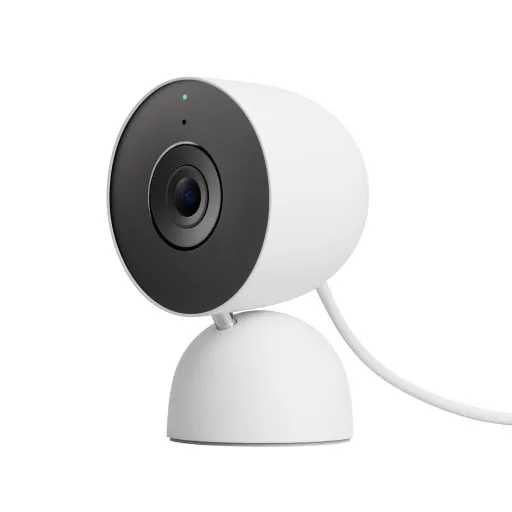
A 2K HDR indoor camera with the widest view in this group and free intelligent alerts in the Google Home app.
Best for: Google Home households who want the best field of view and are willing to pay for video history.
- Google lists 2K HDR video and a 152 degree diagonal field of view, which it calls its widest and tallest yet.
- Person, animal and vehicle alerts and activity zones are included without a subscription.
- A green LED shows when it is processing or streaming video, and it works on a table or a wall mount.
- Without Google Home Premium you get 6 hours of 10-second event previews; 30 or 60 days of event history and 10 days of 24/7 recording are paid tiers.
- It requires the Google Home app and a Google Account and does not work with the old Nest app.
- The product page lists no local storage option and no physical privacy shutter.
Own the Google Nest Cam Indoor (wired, 3rd gen)? Tell us how it held up.
Thanks. Counted, and shown once enough owners have weighed in.
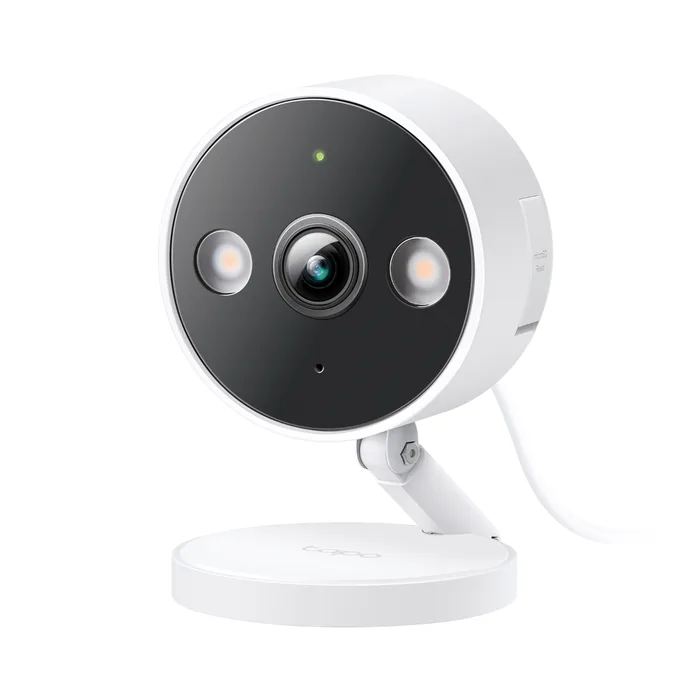
A low-cost 2K+ camera with free on-device AI detection and microSD recording, rated IP66 so it can move outdoors later.
Best for: Budget buyers who want useful alerts and local recording with no monthly fee.
- TP-Link includes person, pet, vehicle and baby cry detection without a subscription, plus glass-break, bark and meow detection in the spec list.
- It records to a microSD card of up to 512 GB, which TP-Link says holds 37 days of 2K footage, and supports RTSP and ONVIF Profile S.
- The spec sheet lists 2560 x 1440 video, color and infrared night vision to 40 ft, two-way audio, custom privacy zones and a UL certification.
- It connects to 2.4GHz Wi-Fi only; TP-Link's FAQ says it does not work with 5GHz.
- Its 115.8 degree diagonal view is narrower than the Nest's, and the frame rate is 20 fps.
- The microSD card is sold separately, and cloud clip history needs a Tapo Care subscription.
Own the Tapo (TP-Link) TP-Link Tapo C120? Tell us how it held up.
Thanks. Counted, and shown once enough owners have weighed in.
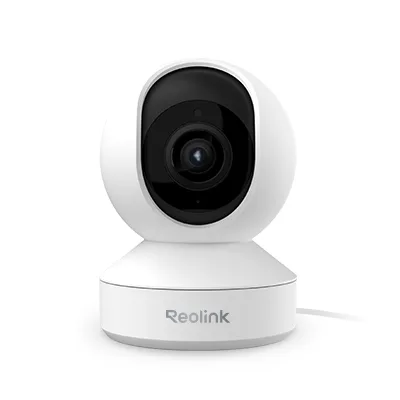
A 4K pan-and-tilt indoor camera with 3x optical zoom, Wi-Fi 6 and plenty of local recording options.
Best for: Owners of large open rooms who want to pan, zoom and record locally without a subscription.
- Reolink lists 3840 x 2160 video, a 3x optical zoom lens, pan of 355 degrees and tilt of 50 degrees, with pan-only auto tracking and up to 64 presets.
- It records to a microSD card up to 512 GB, a Reolink NVR or Home Hub, or FTP and NAS, with motion, scheduled or 24/7 recording and no required fees.
- Dual-band Wi-Fi 6 plus an Ethernet port, a Privacy Mode that stops live view, alerts and recording, and a 2-year limited warranty.
- Reolink says it is for indoor use only and should not be installed outdoors, even under an eave.
- Smart home support is limited to Alexa and Google Assistant; there is no Apple Home support listed.
- Auto tracking follows only on the pan axis, and the main stream defaults to 20 fps.
Own the Reolink E1 Zoom? Tell us how it held up.
Thanks. Counted, and shown once enough owners have weighed in.
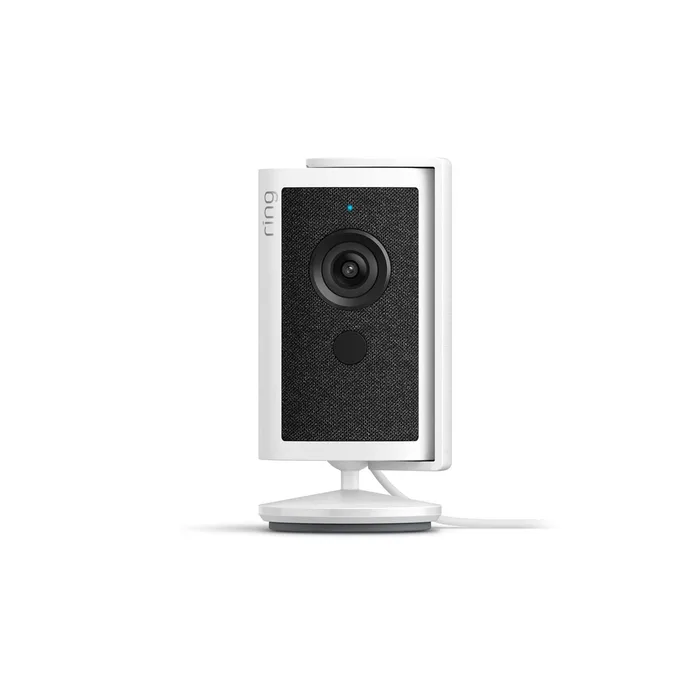
A 4K indoor camera with a removable sliding lens cover, built for households already paying for Ring.
Best for: Existing Ring subscribers who want a physical privacy cover on an indoor camera.
- Ring lists 3840 x 2160 video with Auto HDR, up to 10x enhanced zoom and a 115 degree horizontal field of view.
- The included lens cover slides across the lens and muffles the microphone, and the mic can be fully disabled in the app.
- Dual-band Wi-Fi 6, with optional Power over Ethernet through an adapter sold separately.
- Ring's FAQ says that without a Ring subscription you cannot review, save or share any videos you missed.
- There is no local storage option listed on the product page.
- It carries a one-year limited warranty, and Ring recommends at least 15 Mbps upload, or 20 Mbps for the best 4K experience.
Own the Ring Indoor Cam 4K? Tell us how it held up.
Thanks. Counted, and shown once enough owners have weighed in.
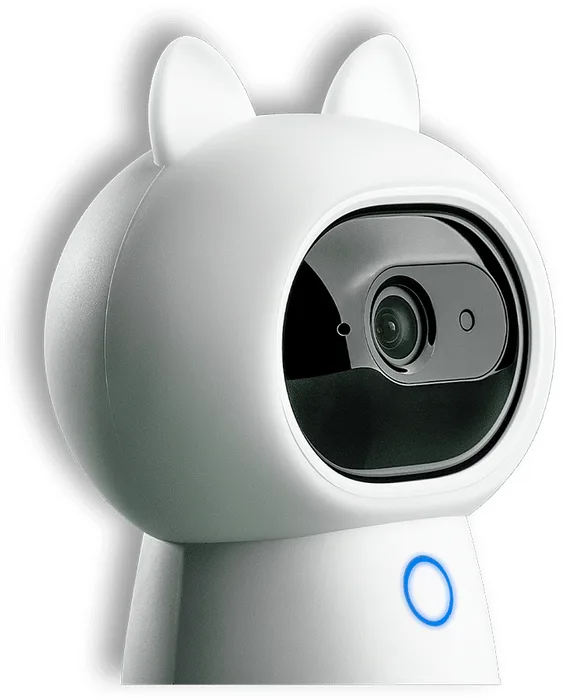
A pan-and-tilt camera that doubles as a Zigbee hub and IR blaster, with HomeKit Secure Video support.
Best for: Apple Home users building an Aqara sensor network who want a camera and hub in one.
- Aqara builds in a Zigbee 3.0 hub for up to 128 Aqara devices and an IR controller whose automations run without internet.
- It supports HomeKit Secure Video, Alexa and Google Home, with local face, gesture and pet recognition on its own processor.
- A 2304 x 1296 sensor, a 110 degree lens on pan and tilt motors, dual-band Wi-Fi and a hardware privacy mode.
- Aqara says that in HomeKit Secure Video mode it records in 1080p and pan and tilt controls are not available.
- Reaching 128 devices requires Zigbee routers such as mains-powered plugs or switches.
- Aqara notes that third-party cloud storage such as HomeKit Secure Video may need a paid subscription.
Own the Aqara Camera Hub G3? Tell us how it held up.
Thanks. Counted, and shown once enough owners have weighed in.
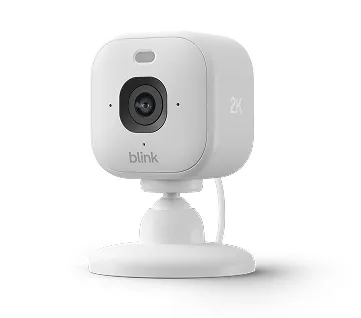
A cheap 2K plug-in camera whose useful features sit behind a subscription or an extra Sync Module.
Best for: Nobody we would steer to it first; the Tapo C120 gives free person alerts and in-camera microSD recording at a similar budget.
- Blink lists 2560 x 1440 video, a built-in spotlight and a built-in siren.
- It is rated IP65 and can go outdoors with Blink's Weather Resistant Power Adapter, sold separately.
- It does not need a Sync Module to work, and it includes a 30-day Plus Plan trial.
- Blink says it records clips of up to 60 seconds, and person and vehicle detection require a Blink Subscription Plan.
- Local storage needs a separate Sync Module 2 with a USB drive or a Sync Module XR with a microSD card; the camera has no card slot of its own.
- It connects to 2.4GHz Wi-Fi only, and live view sessions run up to five minutes without a plan.
Own the Blink Mini 2K+? Tell us how it held up.
Thanks. Counted, and shown once enough owners have weighed in.
| Criteria | Google Nest Cam Indoor (wired, 3rd gen) Top pick Buy it Buy | TP-Link Tapo C120 Buy it Buy | Reolink E1 Zoom Buy it Buy | Ring Indoor Cam 4K It depends Buy | Aqara Camera Hub G3 It depends Buy | Blink Mini 2K+ Skip it Buy |
|---|---|---|---|---|---|---|
| Best for | Google Home households who want the best field of view and are willing to pay for video history. | Budget buyers who want useful alerts and local recording with no monthly fee. | Owners of large open rooms who want to pan, zoom and record locally without a subscription. | Existing Ring subscribers who want a physical privacy cover on an indoor camera. | Apple Home users building an Aqara sensor network who want a camera and hub in one. | Nobody we would steer to it first; the Tapo C120 gives free person alerts and in-camera microSD recording at a similar budget. |
| Price tier | $$ · mid-range | $ · budget | $$ · mid-range | $$ · mid-range | $$ · mid-range | $ · budget |
| Resolution | 2K HDR | 2560 x 1440 | 3840 x 2160 | 3840 x 2160 | 2304 x 1296 | 2560 x 1440 |
| Field of view | 152° diagonal | 115.8° diagonal | Pan 355°, tilt 50° | 115° horizontal | 110° lens with pan and tilt | Not stated in FAQ |
| Free detection | Person, animal, vehicle | Person, pet, vehicle, baby cry and more | Person, pet, crying | Motion alerts and live view | Local face, gesture, pet | Motion only; smart detection needs plan |
| Video history without plan | 6 hours of 10-second previews | microSD recording | microSD, NVR, Home Hub, NAS | None | Local storage | Only with Sync Module and USB or microSD |
| Local storage | Not listed | microSD up to 512 GB | microSD up to 512 GB | Not listed | Yes, per Aqara | Via Sync Module 2 or XR |
| Privacy control | Green recording LED | Custom privacy zones | Privacy Mode | Sliding lens cover, mic off | Hardware privacy mode | Not stated in FAQ |
| Wi-Fi | Not stated on spec page | 2.4GHz only | 2.4/5GHz Wi-Fi 6, Ethernet | 2.4/5GHz Wi-Fi 6, optional PoE | 2.4/5GHz | 2.4GHz only |
| Ecosystems | Google Home | Alexa, Google, SmartThings | Alexa, Google Assistant | Ring app | HomeKit Secure Video, Alexa, Google | IFTTT, Siri Shortcuts |
Which one is right for you?
- Google Home households who want the best field of view and are willing to pay for video history. Buy it Google Nest Cam Indoor (wired, 3rd gen)
- Budget buyers who want useful alerts and local recording with no monthly fee. Buy it Tapo (TP-Link) TP-Link Tapo C120
- Owners of large open rooms who want to pan, zoom and record locally without a subscription. Buy it Reolink E1 Zoom
- Existing Ring subscribers who want a physical privacy cover on an indoor camera. It depends Ring Indoor Cam 4K
- Apple Home users building an Aqara sensor network who want a camera and hub in one. It depends Aqara Camera Hub G3
- Nobody we would steer to it first; the Tapo C120 gives free person alerts and in-camera microSD recording at a similar budget. Skip it Blink Mini 2K+
How we judged the field
Five things decide whether an indoor camera is worth owning. First is the free tier: what you can see, save and be alerted to without a subscription. Second is local storage, since a microSD slot or a home recorder keeps footage when the cloud plan lapses or the internet drops. Third is coverage, meaning resolution together with field of view or pan and tilt. Fourth is privacy, because an indoor camera points at your family; a lens cover, privacy mode or recording light matters. Fifth is the ecosystem, which decides whether the camera shows up on your smart display or in Apple Home.
The field splits into cloud-first cameras from Google, Ring and Blink, local-first cameras from TP-Link Tapo and Reolink, and hub-style cameras like Aqara’s. We picked one strong option from each approach, avoided the cameras already covered in our pet camera review, and included one popular budget model whose limits are spelled out in its own FAQ. Every number comes from the maker’s page.
Google Nest Cam Indoor (wired, 3rd gen)
Buy itThe Google Nest Cam Indoor (wired, 3rd gen) is the best overall pick for homes already using Google Home. Google lists 2K HDR video and a 152 degree diagonal field of view, the widest in this group, so one camera covers most of a living room from a corner. Person, animal and vehicle alerts and activity zones are included for free, and the feed shows up on Nest displays, Google TV Streamer and Pixel Tablet. A green LED lights when the camera is processing or streaming. The catch is history. Without a plan you get 6 hours of 10-second event previews; Google Home Premium Standard extends that to 30 days of event history, and Advanced adds 60 days of events and 10 days of continuous recording plus Gemini search. It requires the Google Home app and a Google Account, and the product page lists no local storage or physical shutter. Buy it if you want the best view and a polished app, and budget for the subscription.
Tapo (TP-Link) TP-Link Tapo C120
Buy itThe TP-Link Tapo C120 is the value pick because its free tier is generous. TP-Link includes person, pet, vehicle and baby cry detection without a subscription, and the spec sheet adds glass-break, bark, meow and tamper detection. Footage records to a microSD card of up to 512 GB, which TP-Link says holds 37 days of 2K footage, and RTSP and ONVIF Profile S support let you feed it into third-party recorders. Video is 2560 x 1440 at 20 fps, with color or infrared night vision to 40 ft, two-way audio, custom privacy zones and a 98 dB siren. It is also rated IP66, so it can move to a porch later, and the certification list includes UL. The trade-offs are 2.4GHz-only Wi-Fi, a narrower 115.8 degree diagonal view than the Nest, and a microSD card you buy separately. Buy it if you want real alerts and recording without a monthly bill.
Reolink E1 Zoom
Buy itThe Reolink E1 Zoom is the camera for big, open rooms. Reolink lists 3840 x 2160 video with a 3x optical zoom lens, so you can zoom into a far corner without the blur of digital zoom, plus 355 degrees of pan, 50 degrees of tilt, up to 64 preset positions and auto tracking on the pan axis. Recording is flexible and fee-free: microSD up to 512 GB, a Reolink NVR or Home Hub, or FTP and NAS, in motion, scheduled or 24/7 modes. It connects over dual-band Wi-Fi 6 or Ethernet, has a Privacy Mode that stops live view, alerts and recording without unplugging, and carries a 2-year limited warranty. The limits are clear too. Reolink says it is indoor only, smart home support stops at Alexa and Google Assistant, and auto tracking does not tilt. Buy it if you want 4K detail, pan and zoom, and footage that stays in your house.
Ring Indoor Cam 4K
It dependsThe Ring Indoor Cam 4K makes sense mainly for people already paying for Ring. Ring lists 3840 x 2160 video with Auto HDR, up to 10x enhanced zoom and a 115 degree horizontal field of view, plus dual-band Wi-Fi 6 and optional Power over Ethernet through an adapter sold separately. Its standout feature is privacy: a removable lens cover slides across the lens and muffles the microphone, and you can disable the mic entirely in the app. The problem is the free tier. Ring’s own FAQ says that without a subscription you get motion notifications and live view, but you cannot review, save or share any video you missed, and the page lists no local storage. The warranty is one year, and Ring recommends at least 15 Mbps of upload speed. Choose it if you already have Ring doorbells or cameras, want everything in one app, and value a cover you can see from across the room.
Aqara Camera Hub G3
It dependsThe Aqara Camera Hub G3 is half camera, half smart home hub. Aqara builds in a Zigbee 3.0 hub for up to 128 Aqara sensors and controllers and an IR controller that can run local automations for infrared devices like air conditioners, even without internet. As a camera it has a 2304 x 1296 sensor, a 110 degree lens on pan and tilt motors, local face, gesture and pet recognition, dual-band Wi-Fi, WPA3 and a hardware privacy mode. It supports HomeKit Secure Video, Alexa and Google Home. There are real caveats. Aqara says that in HomeKit Secure Video mode it records in 1080p and pan and tilt controls are unavailable, reaching 128 devices needs Zigbee routers such as mains-powered plugs, and Aqara notes that third-party cloud storage such as HomeKit Secure Video may carry a subscription fee. Choose it if you are building an Aqara and Apple Home setup and want one device to cover both jobs.
Blink Mini 2K+
Skip itThe Blink Mini 2K+ is cheap and widely sold, but its own FAQ explains why we would skip it. Blink lists 2560 x 1440 video, a spotlight, a siren and an IP65 rating for outdoor use with a separately sold adapter. Then come the limits. Clips run up to 60 seconds, and person and vehicle detection require a Blink Subscription Plan or the trial. For local storage you must add a Sync Module 2 with a USB drive or a Sync Module XR with a microSD card, because the camera has no slot of its own. It connects to 2.4GHz Wi-Fi only, and live view sessions are capped at five minutes unless you subscribe. Compare that with the Tapo C120, which gives free person detection and in-camera microSD recording at a similar budget. Skip it unless you already run a Blink system with a Sync Module and a plan.
Sources
Specs in this review come from these pages.
- Google Store Nest Cam Indoor (wired, 3rd gen) specs (store.google.com)
- TP-Link Tapo C120 product page and specifications (tp-link.com)
- Reolink E1 Zoom product page and specifications (reolink.com)
- Ring Indoor Cam 4K product page and tech specs (ring.com)
- Aqara Camera Hub G3 product page (aqara.com)
- Blink Mini 2K+ FAQ (support.blinkforhome.com)
Google Nest Cam Indoor (wired, 3rd gen) vs Tapo (TP-Link) TP-Link Tapo C120: which should you buy?
The Nest Cam Indoor and the Tapo C120 represent two ways to own a camera. Nest gives you the wider 152 degree view, HDR, a refined app and tight Google Home integration, but meaningful history costs a monthly Google Home Premium plan. The Tapo C120 costs much less, records to its own microSD card, and includes person, pet and vehicle detection for free, with a plainer app and 2.4GHz-only Wi-Fi.
Choose Nest if you live in Google Home, want the camera on your smart display and are happy to pay for history and Gemini search. Choose the Tapo if you want to buy once, keep footage local and still get useful alerts. If you need to cover a big room, step up to the Reolink E1 Zoom rather than either of these.
Who should buy which
- Google Home household: the Google Nest Cam Indoor (wired, 3rd gen). It has the widest view here and free person, animal and vehicle alerts in the Google Home app.
- No-subscription budget buyer: the Tapo (TP-Link) TP-Link Tapo C120. It includes free AI detection and records to its own microSD card.
- Large open-plan room: the Reolink E1 Zoom. 4K, 3x optical zoom, pan and tilt and local recording cover a big space from one spot.
- Privacy-conscious Ring subscriber: the Ring Indoor Cam 4K. Its sliding lens cover blocks the view and muffles the mic.
- Apple Home user with Aqara sensors: the Aqara Camera Hub G3. It adds HomeKit Secure Video and a Zigbee hub in one device.
What to look for
- Free tier: Read exactly what you can review and save without a subscription before comparing prices.
- Local storage: A microSD slot, NVR or NAS option keeps footage if a plan lapses or the internet drops.
- Field of view: A wide diagonal view or pan and tilt decides how many cameras you need per room.
- Privacy control: Look for a lens cover, privacy mode or schedule so the camera is off when you want it off.
- Wi-Fi band: Many budget cameras are 2.4GHz only, which matters if your router or mesh separates bands.
- Ecosystem fit: Pick a camera that appears in the app and smart display you already use.
Our final take
For most homes, the Google Nest Cam Indoor (wired, 3rd gen) is the camera to get if you live in Google Home and accept a subscription for history. If you would rather pay once, the Tapo C120 delivers free AI alerts and local recording at a budget price. The Reolink E1 Zoom is the pick for large rooms, the Ring Indoor Cam 4K for Ring subscribers who want a lens cover, and the Aqara Camera Hub G3 for Apple Home users building out Aqara sensors. Pass on the Blink Mini 2K+, whose best features depend on a plan or an extra module.
Questions, answered
Do I need a subscription for an indoor security camera?
It depends heavily on the brand. The Tapo C120 and Reolink E1 Zoom record to a microSD card and include smart detection without a plan. Nest gives you only 6 hours of short event previews for free, and Ring's FAQ says you cannot review or save missed videos at all without a Ring subscription. Blink puts person detection behind a plan and needs a separate Sync Module for local storage. Check the free tier before you buy, because it decides what the camera costs over its life.
Can I use an indoor camera outdoors?
Only if the maker says so. The Tapo C120 is rated IP66 and TP-Link designs it for both indoor and outdoor use, and the Blink Mini 2K+ is rated IP65 but needs Blink's weather resistant power adapter outside. Reolink says the E1 Zoom must not be installed outdoors, even under an eave. If you mainly need outdoor coverage, see our outdoor security camera comparison.
How do I stop an indoor camera from watching when I am home?
Use the privacy feature the maker provides. Ring includes a sliding lens cover that also muffles the microphone, Reolink and Aqara offer a privacy mode that stops live view and recording, and Tapo lets you block out zones of the frame. A physical cover is the only option you can confirm at a glance.
Is 4K worth it on an indoor camera?
It helps when you want to zoom into a large room, which is where the Reolink E1 Zoom and Ring Indoor Cam 4K make sense. The cost is bandwidth and storage: Ring recommends at least 15 Mbps of upload speed for its 4K camera, and 4K files fill a microSD card faster. For a bedroom or small living room, 2K with a wide view, like the Nest Cam Indoor, usually shows enough. Field of view and night performance often matter more than raw pixels.
Should I buy a pet camera or a security camera?
If you mainly want to talk to or reward a pet, a dedicated pet camera with a treat tosser does that job better, and our pet camera comparison covers those. For general home monitoring, an indoor security camera with person detection, privacy controls and local recording is the better fit. Several cameras here, including the Tapo C120 and Reolink E1 Zoom, also detect pets. For the front door, a video doorbell covers what an indoor camera cannot.
Deciding between the top two? See our head-to-head: Google Nest Cam Indoor (wired, 3rd gen) vs Tapo (TP-Link) TP-Link Tapo C120.
More in Smart Home
Indoor Security Cameras, Explained Plain-English guide → Google Nest Cam Indoor (wired, 3rd gen) vs Tapo (TP-Link) TP-Link Tapo C120 Head-to-head →  The Best Outdoor Security Cameras: Wide Coverage Without the Monthly Trap
  The Best Mid-Range Robot Vacuums in 2026 (and the One to Skip)
  The Best Smart Blind & Shade Motors: 4 Compared (and One to Skip)
  The Best Smart Displays: 4 Compared (and One to Skip)